After-hours answering for trades in Canada: voicemail, a service or AI
There are four common ways for a trade to cover the phone after hours: voicemail with a fast callback, the on-call tech's cell, a human answering service, or an AI assistant. The right one depends on three questions: does someone hear the caller, can the job get booked, and where do real emergencies go. You can also mix two of them.
This guide is for owners of HVAC, plumbing, electrical, garage door and other trades in Canada who are deciding who picks up when the office is closed. It compares the four usual setups on what matters at 11 p.m., not on features. For prices of AI receptionist software in detail, see our AI receptionist cost guide. If you’d rather have it set up and run for you, that’s our AI call answering service.
Three questions that decide it
Before you compare prices, answer these for your shop.
- Does someone hear the caller? A person or an assistant who responds, or a beep. Many callers with a real problem won’t leave a message. They’ll call the next company on the list.
- Can the job get booked? A booked job in your calendar is worth more than a message you have to return at 7 a.m., after the caller has found someone else.
- Where do real emergencies go? A gas smell, no heat with a baby in the house, water through the ceiling. Someone has to decide what counts, and the caller has to reach your on-call person fast, or be told to get out and call 911.
Every option below answers those questions differently.
Option 1: voicemail and a fast callback
Voicemail is free and it’s what most small shops already have. It works when after-hours calls are few, rarely urgent, and someone calls back first thing.
The weakness is the caller who won’t wait. A homeowner with no heat at 10 p.m. in January isn’t going to leave a message and hope. Voicemail also gives you no way to sort the emergency from the price shopper until morning.
If you keep voicemail, make it work harder. Say when you’ll call back, give an emergency number if you have an on-call tech, and tell anyone who smells gas to leave the building and call from outside. Then actually call back at the time you promised.
One more cost, if you run Google Local Services Ads: Google can now charge for an unanswered call during your business hours and ad schedule once the caller stays on past 20 seconds, and voicemail counts. Calls outside the hours you’ve set aren’t charged as missed calls, though a voicemail message left after hours can still count as a valid lead. Here’s what the missed-call charge means and what to change.
Option 2: forward to the on-call tech’s cell
Many trades already do this. The office line forwards to whoever is on call, and that person decides whether to roll a truck.
It’s the best answer to the emergency question, because the caller reaches someone who can judge the job. It costs nothing extra beyond what you pay for on-call time.
It breaks in three places. The tech is under a furnace on another call and can’t pick up. The tech is asleep and every wrong number and price shopper wakes them. And nobody books the routine jobs that come in at night, so they go to voicemail anyway. Burned-out on-call staff is a real cost, even if it doesn’t show on an invoice.
Option 3: a human answering service
A service gives you people on the phone around the clock. Some take a message and text it to you. Others can follow a script, book into your calendar and notify your on-call person.
Posh, an answering service that sells in Canada, publishes its prices. On its after-hours answering page, effective January 1, 2026, plans run from CA$65 a month with no minutes included to CA$1,900 for 1,000 minutes, with extra minutes at CA$1.90 to $2.30. The same page says a receptionist can schedule an appointment on your calendar. Its pricing page says it works on month-to-month agreements and can connect to your software for scheduling. The same pricing page also quotes a lower starting rate in its FAQ, without a currency, so confirm the figures with Posh before you sign.
Here’s an example with round numbers. They’re assumptions, not statistics: 40 after-hours calls a month, three minutes each, so 120 minutes. On that table, the cheapest option is the CA$215 plan with 100 minutes plus 20 extra minutes at CA$2.15, which comes to CA$258 a month. Ask any service how it rounds call time, because that changes the bill.
What to check with any service:
- Whether they book into your calendar or job software, or only take messages
- How they reach your on-call person for an emergency, and how fast
- Whether they record calls, and what they tell callers about it
- Whether agents follow your script or a generic one, and who updates it when your prices change
Option 4: an AI assistant
An AI assistant answers in your company’s name, asks the questions you give it, books routine jobs and sends you a summary. A good setup passes real emergencies to your on-call person and tells anyone who smells gas to get out and call 911.
It’s usually cheaper than people at the same volume. In our comparison of AI receptionist plans, checked November 10, 2026, software alone came to roughly $90 to $300 a month at 150 calls of three minutes each. At the same 150 calls, Posh’s cheapest option came to about CA$900. The full price table has the plans and the maths.
The catch is setup. It only knows what you write in its fact sheet: your service area, your after-hours fee, what counts as an emergency. It needs testing with the calls that go wrong in real life before a customer hears it. And it should never pretend to be a person. Ours says it’s an AI assistant whenever a caller asks.
How the four compare
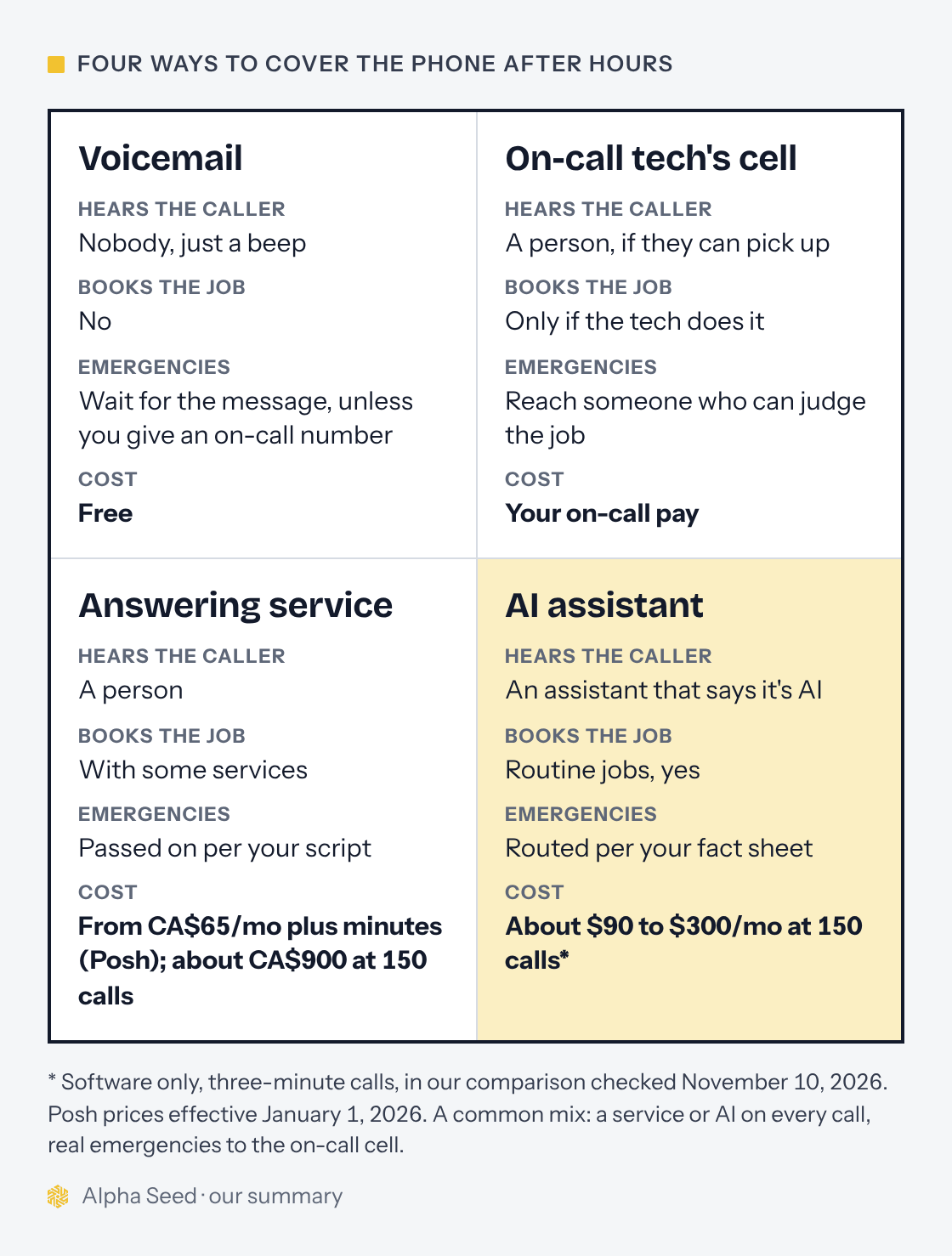
You don’t have to pick one. A common setup is an answering service or AI assistant on every call, with real emergencies passed to the on-call tech’s cell. The tech only wakes up for the calls that need a truck.
Whatever you pick: emergencies and recording
Gas. Write the gas script first. The City of Calgary tells people who smell gas to leave the building immediately, not to turn light switches on or off, use a phone or create a spark, and to contact the utility or 911 once they’re somewhere safe. It gives the ATCO Gas emergency line, 1-800-511-3447. Whoever answers your phone, person or AI, should tell the caller to hang up, leave now and call ATCO Gas or 911 from outside, and not take any details on that call. Outside ATCO’s area, use your own gas utility’s emergency line, or 911. We treat a carbon monoxide alarm the same way: get out and call 911.
Recording. If any of these setups records calls, the Privacy Commissioner of Canada’s guidance on recording customer calls, updated October 8, 2026, applies. You must tell callers they’re being recorded, say why as clearly and narrowly as you can, and give them a choice. If recording isn’t integral to the service, you have to offer an alternative. And if you contract out your call answering, you have to make sure the contractor follows the same rules. We aren’t lawyers, so check your own setup.
When paid cover isn’t worth it
- You get a few after-hours calls a week, and most can wait. Good voicemail and a 7 a.m. callback will do.
- You don’t do emergency work. Say your hours plainly on your voicemail and your Google profile, and send emergencies somewhere that does.
- Your on-call tech already picks up nearly every time and doesn’t mind. Don’t fix what works. Check it once in a while by calling at 11 p.m.
What we’d do first
Pull last month’s call log from your phone provider. Count the calls that came in after hours, how many nobody answered, and how many of those callers never called back. That number, times what an average job is worth to you, is the most the gap could be costing you.
For an outside check, our free scan calls your line outside your posted hours, records what happens and shows where you stand on Google Maps. You’ll hear back within one business day, with no sales call unless you ask. If you want it covered, we have two plans: Starter includes after-hours and overflow answering along with your Google Business Profile, reviews and call tracking, and Growth adds 24/7 answering that books into your calendar. We quote each business after a 20-minute demo, and both start with a 90-day paid pilot, then go month to month with 30 days’ notice. Book a demo.
Sources
- Posh, After-hours answering service, prices effective January 1, 2026, and Pricing, both read November 11, 2026.
- City of Calgary, What to do during a utility outage, read November 11, 2026.
- Office of the Privacy Commissioner of Canada, Recording of customer telephone calls, modified October 8, 2026, read November 11, 2026.
- Alpha Seed, AI receptionist in Canada: what it costs and what to check, prices read November 10, 2026, and Google now charges for missed Local Services Ads calls, with Google’s own help pages linked there.
This guide is general information, not legal or safety advice for your situation, and prices change. Check each vendor’s current pricing page and the official sources before relying on any detail here.
After-hours answering questions
What is the cheapest way to cover after-hours calls?
Voicemail and a fast callback cost almost nothing, and forwarding to the on-call tech’s cell costs only their time. Both lose callers who won’t leave a message or wait. Paid cover starts at CA$65 a month for one human answering service’s smallest plan and climbs with minutes. At 150 three-minute calls a month, the AI plans we priced on November 10, 2026 ran about $90 to $300 for the software, and that service’s cheapest option was about CA$900.
Can an answering service book jobs?
Some can. Posh, an answering service that sells in Canada, says its receptionists can schedule an appointment on your calendar. Many services take a message and pass it on instead, so ask whether they write into your calendar or job software, and what they do with an emergency.
Is voicemail enough for a small trade?
It can be, if you get a handful of after-hours calls a week, most aren’t urgent, and you call back first thing. If you run Google Local Services Ads, a voicemail during your business hours and ad schedule can be charged as a lead once the caller stays past 20 seconds.
What should happen when an after-hours caller smells gas?
Whoever answers should tell the caller to hang up, leave the building now, and call from outside. The City of Calgary says not to use a phone or create a spark inside, and to contact the utility or 911 once you’re somewhere safe; it gives the ATCO Gas emergency line, 1-800-511-3447. Outside ATCO’s area, use your own gas utility’s emergency line, or 911. Don’t take any details on that call.
Do I have to tell callers the call is recorded?
If you record, yes. The Privacy Commissioner of Canada says a business must tell the caller the call is being recorded, say why, and give them a choice. If an answering service or AI vendor records for you, you’re responsible for making sure it follows the same rules.
Keep reading
-
HVAC SEO in Calgary: what moves calls in furnace season
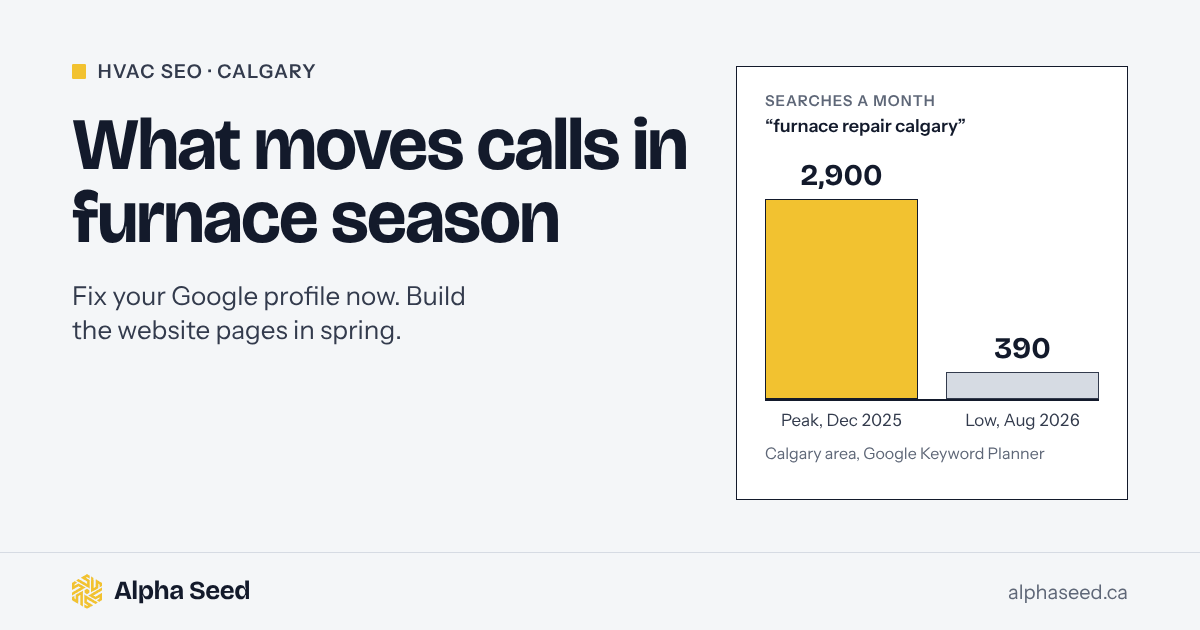
Calgary furnace searches rise about sevenfold by December. What an HVAC company can change on Google this winter, and the website work to start in spring.
-
Restoration companies in Calgary: get the first call after a cold snap
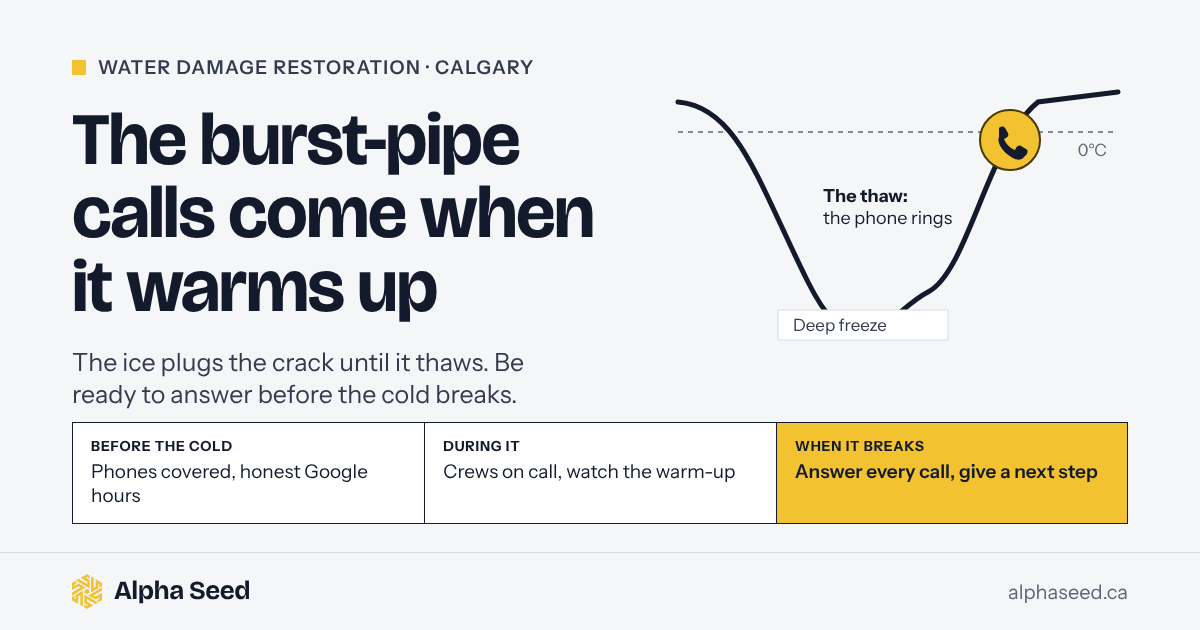
In Calgary, burst pipes often show up when a cold snap breaks. How restoration companies get the first call: phones, a triage script, Google hours and tracking.
-
How to ask for Google reviews: Google's rules and CASL
How to ask customers for Google reviews in Canada without breaking Google's rules or the anti-spam law, with a request you can send after every job.
See where your calls and your Google profile stand
The free scan shows where you rank on Google Maps across your service area and what happens when someone calls you after hours. One email, no obligation.